Can AI Be Integrated Into Existing CRM and ERP Systems?
Last Updated on
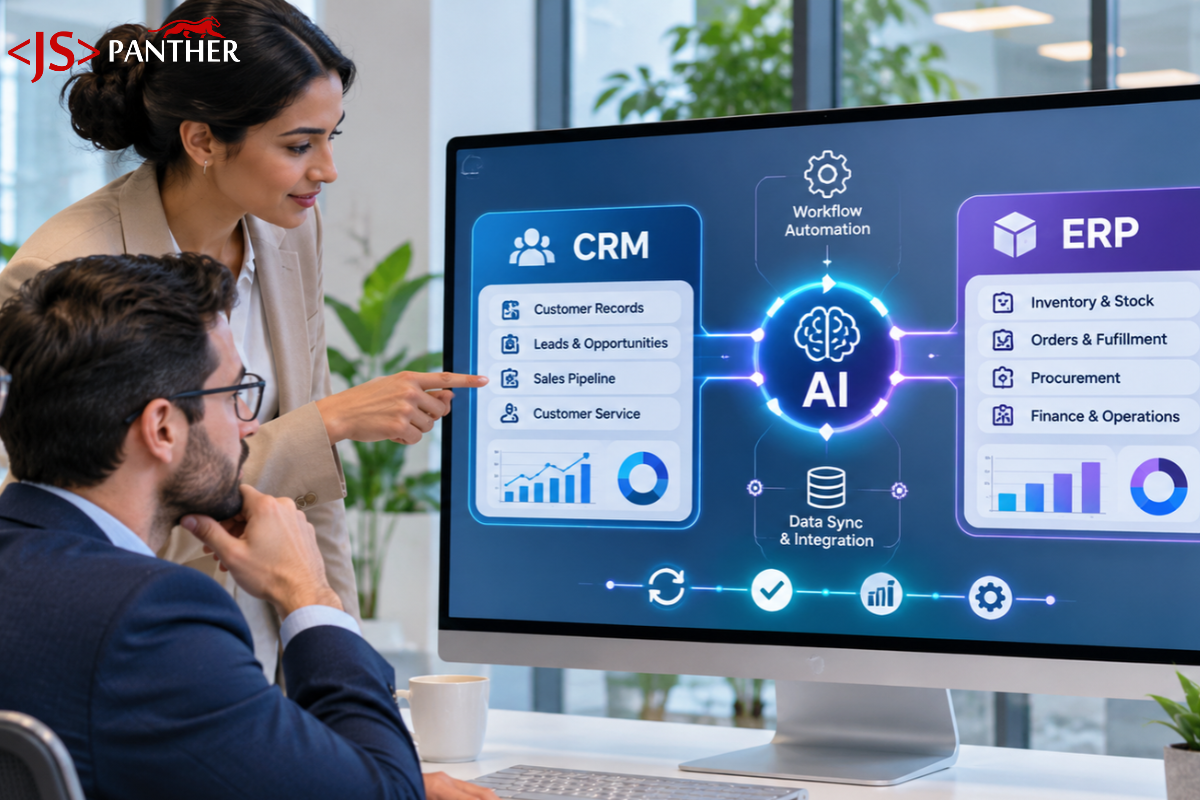
AI can be added to the existing CRM and ERP systems without replacing them. Through an API, your current software can connect to an AI model or agent that works with the data you already have. Once it’s set up properly, AI can read your records, answer questions, suggest next steps, and update records only when permitted.
This is only feasible when your system shares its data through an API and when the records are clean and well-organized. AI can’t do much with unreliable information, which makes it essential to keep a check on these two factors. A renowned CRM development company in Raleigh can usually tell you quickly whether your system meets these two conditions.
Successful integration also requires having a clear goal, such as automating data entry, generating reports, or answering questions from the data.
Once those basics are in place, the next step is choosing the kind of AI that fits your business, since each type handles a different job.
What types of AI can businesses integrate into CRM and ERP systems?
Businesses can add five main types of AI to their CRM and ERP systems: predictive AI, generative AI, natural-language search, document automation, and AI agents. Each one handles a different job, so the right choice depends on the problem you want to fix.
- Predictive AI: This basically uses past data to predict future outcomes. Integrating CRM with predictive AI helps in scoring leads and flagging customers who may be about to leave. And with ERP, it can predict demand and stock levels, helping in making informed restocking decisions.
- Generative AI: For businesses looking for an AI solution that can help with writing and summarizing, this is the best option. It can simply write and summarize follow-up emails, sales calls, and financial data. It can further take meeting notes, suggest replies to customer queries, and draft proposals from the existing information, saving a lot of time.
- Natural-language search: This allows your staff to find information using the existing data in plain language. For example, someone can ask, “Which clients haven’t ordered in 90 days?” and get a list straight away. Nobody has to dig through folders or run a complicated report every time.
- Document automation: This AI integration reads invoices, purchase orders, and emails, then creates the records in your CRM or ERP for you. It’s a good fit for paperwork-heavy industries like healthcare, life sciences, and logistics, where manual data entry is slow, and mistakes are common.
- AI agents: Go a step beyond suggestions by working through tasks for your team. They can work across your CRM and ERP together, so one request doesn’t mean jumping between systems. For Raleigh businesses with small teams, an agent works like an extra team member who handles the routine steps while your people make the final calls.
It is important to understand which type of AI fits your business. However, it is only half the process. You need to also understand how these tools actually connect to the existing business systems.
Can AI work with legacy software?
Yes, AI can work with legacy software without replacing it. If the system has an API, AI connects directly. If not, an automation layer can use the software the way a person would, or pull data from its database, so older systems can still benefit from AI.
Your old system is rarely the real problem
Often, businesses consider their legacy software the problem behind slow processes. However, the real problem is manually moving information between systems. Copying numbers from one screen to another, matching a spreadsheet against the ERP, or retyping an email into a portal often takes extra time.
Integrating AI takes over the manual work. This means that the older system can stay the same and additional features are added using AI.
How does legacy software connect with AI?
There are 3 different ways to connect AI to your legacy software.
- Through an API or database connection: For a stable connection, using an API if possible is recommended. Many older systems still have an API, a database you can read, or a scheduled export that nobody uses. Your IT team or software vendor can tell you what your system offers.
- Through screen automation – For legacy software with no API, AI can work through the screen the way a person would. By simply logging in, reading fields, and entering data. This works on almost any system with a usable interface, but it can break when a screen layout changes, so it needs monitoring.
- Through a human approval step – For legacy software where the above two options fail to work, the option to let AI prepare the work and a person make the final entry is feasible. This keeps errors out of the system and eliminates risk for high-stakes actions like payments.
The choice of the approach depends upon the requirements and what fits the system. A single project can mix all three based on the software requirements.
When It Makes Sense to Modernize Legacy Software First
Often, adding AI on top is usually the best approach, but at times you might require a different approach. You might have to modernize your legacy software first in situations when your system is failing, no longer supported, or a security risk. Adding AI in such situations will only automate a weak foundation.
Therefore, it becomes important to fix the system first. Here are a few signs your system needs modernization.
- The vendor no longer provides updates or security patches
- The system crashes often or loses data
- It can’t meet security or compliance requirements
- Your team can’t run the process reliably, even manually
Ready to integrate AI with your CRM or ERP?
Talk to JS Panther. We’ll check your systems and data first, then map out the simplest way to connect AI.
Talk to Our Team
What Data and API Access Are Required?
The business data, like customer profiles, sales records, transaction history, inventory information, etc., primarily powers the AI operations. AI, when integrated with the existing systems, uses this information to identify patterns, analyse the market, generate insights, and perform any specific workflow.
The access permissions depend on the tasks the AI solution is required to carry out. An API with read and write access can update records only when you permit. Here is what you need to prepare:
- API or database access: Ask your software vendor or IT team if your system has an API with written instructions, and whether you can get read and write access with a proper login.
- Clean, organized records: Duplicate customers, mixed-up formats, and half-filled fields give you poor AI results. Spend a little time cleaning them up first.
- Limited permissions: The AI should only see and do what the person using it is allowed to. Don’t let it run on a shared admin login.
- One clear starting task: Pick one process, like lead scoring or invoice entry. That way you know exactly what data the AI needs.
How Much Does AI Integration Cost?
AI integration usually costs between $5,000 and $1,500,000+. For a basic API-based AI chatbot development, it usually falls between $5,000- $30,000. Whereas for a complex enterprise-wide custom platform, it is usually somewhere between $150,000 – $1,500,000+.
The cost depends less on the AI itself and more on how hard it is to connect to your existing system. A modern CRM with a good API costs far less to integrate than an older system with no API, which needs middleware or screen automation.
What drives the price:
- API access – Legacy systems have older APIs, which usually take more engineering time, and systems with no API usually cost the most.
- Data quality – Business data can include duplicate records that usually take more time to be managed.
- Number of actions – The number of actions you make your AI solution perform affects the final cost.
- Business rules – The more custom logic you need to recreate, the higher the cost.
Starting with one focused process, or with AI features already included in your CRM, keeps the first investment small. The best way to get a real number is to have a partner assess your actual systems, instead of guessing any price.
What Security and Data Privacy Risks Should Businesses Consider?
Partnering with one of the best ERP Software Development Companies in the USA can save you from potential security and data privacy risks. Exposing sensitive data, granting too much access, and skipping the final check are the most common AI threats. The right team and the right setup from the start can keep these risks under control.
- Data exposure – Granting too much access to business-sensitive data can often turn into a disaster. Thus, it is important to keep a check on what data AI can see and where the model runs.
- Excess access – Giving role-based permissions ensures AI only reaches what each user is permitted to see.
- Wrong answers – Entirely depending on AI answers can end up being a huge risk. At times, AI can share incorrect results. Thus, it is essential to verify the data before using it further.
- No audit trail – If you can’t see what the AI did, you can’t fix mistakes. Keep a log of everything it reads and changes.
If your business handles health, financial, or customer personal data, check your compliance requirements before you connect anything, and involve your IT or legal team early.
When Is Custom AI Development Better Than a Ready-Made Tool?
Every business and its processes are different. Simply adding a ready-made tool can complicate things, especially when you have specific requirements. Platforms such as Salesforce, HubSpot, and Microsoft Dynamics already include AI features like lead scoring, summaries, and email drafting, often at a lower cost and risk.
Ready-made tools fit when:
- Your needs are common, such as call summaries or lead scoring
- You want to start quickly with a small budget
- Your data already lives in one major platform
Custom development fits when:
- Your process is unusual and built-in features don’t cover it
- The AI needs to work across several systems at once
- You have an older or custom-built system with no standard connector
- You need tighter control over data, security, or where the model runs
Many businesses do both: they start with built-in features, then add a custom build only for the gaps. Choosing a complex custom build when a built-in feature would do is a common and costly mistake.
How Should Businesses Choose an AI Integration Partner?
When you’re choosing an AI development company, pick one that looks at your current systems before it quotes you a price. The right partner will tell you what’s possible, what isn’t, and what it will take to connect AI to your CRM and ERP.
What to look for:
- An assessment first – They should review your CRM and ERP, check API availability, and look at your data quality before sharing a quote.
- Honest answers – Be cautious of anyone who says every system is easy to integrate. Real projects have limits and exceptions.
- Experience with your systems – Ask whether they’ve worked with your platform, such as Salesforce, SAP, NetSuite, or an older custom system.
- A small first step – Look for a plan that tests one process with real data before a full rollout.
- Security built in – They should explain how they handle permissions, approvals, and data privacy.
- Clear ownership – You should know who maintains the integration after launch.
Conclusion!
Adding AI to your CRM and ERP doesn’t mean rebuilding. If your system can share its data and your records are clean and well organized, you can connect AI to what you already use and start with one clear task.
Keep access limited, let people approve important changes, and test on one process before you expand. The best first step is a review of your current systems by a partner such as JS Panther, who will give you honest answers about what’s possible.
FAQs
How long does an AI integration process take?
The timeline for AI integration varies depending on the data. It depends on the process and the data. A simple automation for one workflow can be up and running much sooner, while a full enterprise rollout can take 6 to 12 months or longer.
What is the biggest challenge in integrating AI with existing software?
The biggest challenge is usually the data itself. If your records are duplicated, out of date, or spread across several tools, tidy them up before you bring in AI, or you won’t get reliable results.
Can small and mid-sized businesses integrate AI into their existing software?
Yes. Many platforms already come with built-in AI features that don’t need any custom development, so even businesses without a big technical team can get started.
What data do I need for a successful AI integration?
AI is only as good as the data behind it. For an ERP, you need clean records for your products, suppliers, and customers, plus past transaction data so the AI can spot patterns and forecast. For a CRM, you need full contact histories, deal stages, and communication records. Before you start any AI project, check your data quality first.